GraphFrames的基本使用
在本节中,我们将使用Spark GraphFrames来建立图模型并进行研究。图的顶点和边被存储为DataFrame,并且支持基于Spark SQL和DataFrame的查询对它们进行操作。由于DataFrame可以支持各种数据源,因此可以从关系表、文件(JSON、Parquet、Avro和CSV)等等读取输入顶点和边信息。
顶点DataFrame必须包含一个叫做id的列,它为每个顶点指定唯一的ID。类似地,边DataFrame必须包含名为src(源顶点的ID)和dst(目标顶点的ID)的两列。顶点DataFrame和边DataFrame都可以包含额外的属性列。
GraphFrames公开了一个简洁的语言集成API,它统一了图分析和关系查询,集成了图算法、模式匹配和查询。机器学习代码、外部数据源和UDF可以与GraphFrames集成来构建更复杂的应用程序。
1. 添加GraphFrames依赖
因为GraphFrames并不存在于Spark的发行包中,因此需要首先添加其依赖包。当前GraphFrames的最新版本是0.8.1。请注意指定兼容的Spark版本,目前直接支持的是Spark 3.0,对应的Scala版本为2.12。根据开发方式的不同,使用不同的依赖添加方式,说明如下:
(1) 如果是通过IDE进行开发(如IntelliJ IDEA),则可以在Maven项目的pom.xml配置文件中添加如下的依赖:
<dependency>
    <groupId>graphframes</groupId>
    <artifactId>graphframes</artifactId>
    <version>0.8.1-spark3.0-s_2.12</version>
</dependency>
(2) 或者SBT项目的build.sbt配置文件中添加如下依赖:
libraryDependencies += "graphframes" % "graphframes" % "0.8.1-spark3.0-s_2.12"
(3) 如果是使用spark-shell,则可以在启动spark-shell时,通过--packages选项参数指定依赖,命令如下:
$ spark-shell --master spark://localhost:7077 --packages graphframes:graphframes:0.8.1-spark3.0-s_2.12
然后spark-shell会自动下载GraphFrames jar包并缓存。
(4) 如果是使用Zeppelin Notebook进行Spark图计算开发,则最简单的方式是先下载graphframes-0.8.1-spark3.0-s_2.12.jar包,并将其拷贝到$SPARK_HOME/jars/目录下和$ZEPPELIN_HOME/lib/目录下,然后重启Spark和Zeppelin(如果已经启动了的话)。
2. 构造图模型
假设现在要分析一个社交网络,如下图所示。
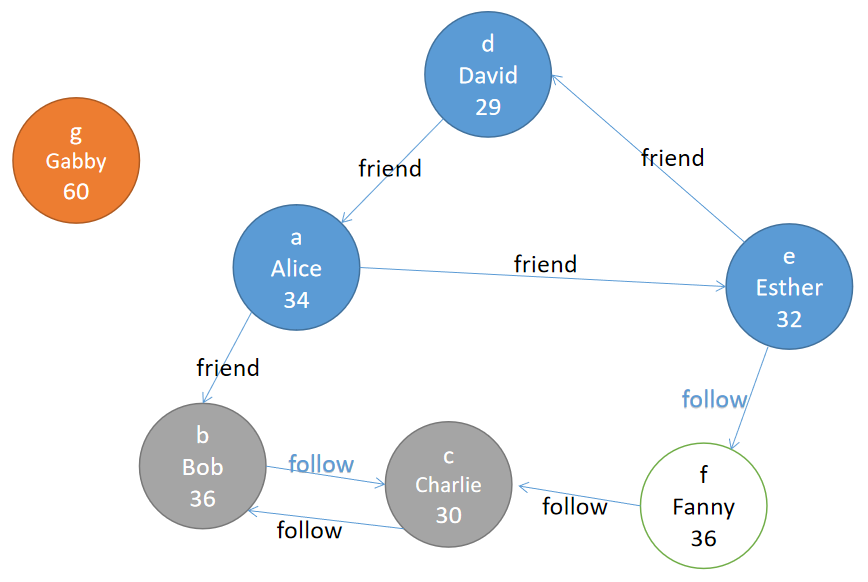
首先需要导入相应的依赖包,代码如下:
import org.apache.spark.sql.SparkSession
import org.graphframes._
可以从顶点和边DataFrames创建GraphFrame图对象。顶点DataFrame应该包含一个名为id的特殊列,它为图中的每个顶点指定惟一的id。边DataFrame应该包含两个特殊列:src(边的源顶点ID)和dst(边的目标顶点ID)。
这两个DataFrame都可以有任意其他列,这些列可以表示顶点和边属性,代码如下:
// 顶点DataFrame
val v = spark.createDataFrame(List(
      ("a", "Alice", 34, 234, "Apples"),
      ("b", "Bob", 36, 23232323, "Bananas"),
      ("c", "Charlie", 30, 2123, "Grapefruit"),
      ("d", "David", 29, 2321111, "Bananas"),
      ("e", "Esther", 32, 1, "Watermelon"),
      ("f", "Fanny", 36, 333, "Apples" ),
      ("g", "Gabby", 60, 23433, "Oranges")
)).toDF("id", "name", "age", "cash", "fruit")

// 边DataFrame
val e = spark.createDataFrame(List(
      ("a", "b", "friend"),
      ("b", "c", "follow"),
      ("c", "b", "follow"),
      ("f", "c", "follow"),
      ("e", "f", "follow"),
      ("e", "d", "friend"),
      ("d", "a", "friend"),
      ("a", "e", "friend")
    )).toDF("src", "dst", "relationship")

v.show()
e.show()

// 使得这些顶点和这些边构建图模型
val g = GraphFrame(v, e)
这个示例图还可来自GraphFrames的examples包,代码如下:
import org.graphframes.examples.Graphs

val g2 = examples.Graphs.friends
3. 简单图查询
GraphFrame提供简单的图查询,如节点的入度、出度和度数。此外,由于GraphFrame将图表示为顶点DataFrame和边DataFrame,因此很容易直接对顶点和边DataFrame进行强大的查询。例如,查看图的顶点和边信息,代码如下:
// 查看顶点和边
g.vertices.show()
g.edges.show()
输出结果如下:
+---+-------+---+--------+----------+
| id|    name|age|     cash|     fruit|
+---+-------+---+--------+----------+
|  a|   Alice| 34|     234|     Apples|
|  b|     Bob| 36|23232323|   Bananas|
|  c|Charlie| 30|     2123|Grapefruit|
|  d|   David| 29| 2321111|   Bananas|
|  e| Esther| 32|         1|Watermelon|
|  f|   Fanny| 36|     333|     Apples|
|  g|   Gabby| 60|   23433|    Oranges|
+---+-------+---+--------+----------+

+---+---+------------+
|src|dst|relationship|
+---+---+------------+
|  a|   b|       friend|
|  b|   c|       follow|
|  c|   b|       follow|
|  f|   c|       follow|
|  e|   f|       follow|
|  e|   d|       friend|
|  d|   a|       friend|
|  a|   e|       friend|
+---+---+------------+
查看所有节点的入度,代码如下:
// 查看所有节点的入度
g.inDegrees.show()
g.inDegrees.sort("id").show()
输出结果如下:
+---+--------+
| id|inDegree|
+---+--------+
|  f|         1|
|  e|         1|
|  d|         1|
|  c|         2|
|  b|         2|
|  a|         1|
+---+--------+

+---+--------+
| id|inDegree|
+---+--------+
|  a|         1|
|  b|         2|
|  c|         2|
|  d|         1|
|  e|         1|
|  f|         1|
+---+--------+
查看所有节点的出度,代码如下:
// 查看所有节点的出度
g.outDegrees.show()
g.outDegrees.sort("id").show()
输出结果如下:
+---+---------+
| id|outDegree|
+---+---------+
|  f|          1|
|  e|          2|
|  d|          1|
|  c|          1|
|  b|          1|
|  a|          2|
+---+---------+

+---+---------+
| id|outDegree|
+---+---------+
|  a|          2|
|  b|          1|
|  c|          1|
|  d|          1|
|  e|          2|
|  f|          1|
+---+---------+
查看所有节点的总度数(即出入度之和),代码如下:
// 查看所有节点的总度数(即出入度之和)
g.degrees.show()
g.degrees.sort("id").show()
输出结果如下:
+---+------+
| id|degree|
+---+------+
|  f|      2|
|  e|      3|
|  d|      2|
|  c|      3|
|  b|      3|
|  a|      3|
+---+------+

+---+------+
| id|degree|
+---+------+
|  a|      3|
|  b|      3|
|  c|      3|
|  d|      2|
|  e|      3|
|  f|      2|
+---+------+
可以直接在顶点DataFrame上运行查询。例如,找到图中最年轻的人的年龄,代码如下:
// 找到图中最年轻的人的年龄
val youngest = g.vertices.groupBy().min("age")
youngest.show()
输出结果如下:
+--------+
|min(age)|
+--------+
|       29|
+--------+
找出年龄小于30岁的人,代码如下:
// 找出年龄小于30岁的人
val lt30 = g.vertices.filter("age < 30")
lt30.show()
输出结果如下:
+---+-----+---+
| id| name|age|
+---+-----+---+
|  d|David| 29|
+---+-----+---+
同样,可以在边DataFrame上运行查询。例如,统计一下图中follow关系的数量,代码如下:
// 统计一下图中“follow”关系的数量
g.edges.filter("relationship = 'follow'").count()      // 4
可以看到结果输出为4。
如果想知道c的粉丝有多少,分别是谁呢?GraphFrame对象有一个triplets属性,它是一个DataFrame,具有src、edge、dst三列,分别代表源顶点、边和目标顶点,代码如下:
g.triplets.printSchema()
输出结果如下:
root
 |-- src: struct (nullable = false)
 |    |-- id: string (nullable = true)
 |    |-- name: string (nullable = true)
 |    |-- age: integer (nullable = false)
 |-- edge: struct (nullable = false)
 |    |-- src: string (nullable = true)
 |    |-- dst: string (nullable = true)
 |    |-- relationship: string (nullable = true)
 |-- dst: struct (nullable = false)
 |    |-- id: string (nullable = true)
 |    |-- name: string (nullable = true)
 |    |-- age: integer (nullable = false)
查看triplets的内容,代码如下:
g.triplets.show()
输出结果如下:
+----------------+--------------+----------------+
|               src|            edge|                dst|
+----------------+--------------+----------------+
|  [a, Alice, 34]|[a, b, friend]|     [b, Bob, 36]|
|    [b, Bob, 36]|[b, c, follow]| [c, Charlie, 30]|
|[c, Charlie, 30]|[c, b, follow]|     [b, Bob, 36]|
|  [f, Fanny, 36]|[f, c, follow]| [c, Charlie, 30]|
| [e, Esther, 32]|[e, f, follow]|   [f, Fanny, 36]|
| [e, Esther, 32]|[e, d, friend]|   [d, David, 29]|
|  [d, David, 29]|[d, a, friend]|   [a, Alice, 34]|
|  [a, Alice, 34]|[a, e, friend]|  [e, Esther, 32]|
+----------------+--------------+----------------+
从中找出关系为follow的数据,代码如下:
g.triplets.filter("edge.relationship = 'follow'").show()
输出结果如下:
+----------------+--------------+----------------+
|               src|            edge|                dst|
+----------------+--------------+----------------+
|    [b, Bob, 36]|[b, c, follow]|[c, Charlie, 30]|
|[c, Charlie, 30]|[c, b, follow]|    [b, Bob, 36]|
| [e, Esther, 32]|[e, f, follow]|  [f, Fanny, 36]|
|  [f, Fanny, 36]|[f, c, follow]|[c, Charlie, 30]|
+----------------+--------------+----------------+
进一步找出与c有follow关系的数据,代码如下:
g.triplets
 .filter("edge.relationship = 'follow'")
 .filter("edge.dst = 'c'").show()
输出结果如下:
+--------------+--------------+----------------+
|             src|            edge|                dst|
+--------------+--------------+----------------+
|  [b, Bob, 36]|[b, c, follow]|[c, Charlie, 30]|
|[f, Fanny, 36]|[f, c, follow]|[c, Charlie, 30]|
+--------------+--------------+----------------+
那么,c的粉丝有多少?粉丝都有谁?代码如下:
val followers = g
	.triplets
	.filter("edge.relationship = 'follow'")
	.filter("edge.dst = 'c'")
	.count
println("c的粉丝数:" + followers)

g.triplets
 .filter("edge.relationship = 'follow'")
 .filter("edge.dst = 'c'")
 .select("src")
 .show
输出结果如下:
c的粉丝数:2
+--------------+
|             src|
+--------------+
|  [b, Bob, 36]|
|[f, Fanny, 36]|
+--------------+